Unfortunately, the existing reconcile balance in QuickBooks Online isn’t transferred over to QuickBooks Desktop. After the conversion, when you attempt to reconcile in Desktop, you'll see that the beginning balances are zero.
This can be fixed by running a single reconcile for the last reconciled month in QuickBooks Online. To make this work, all the transactions that were previously reconciled in QuickBooks Online are marked as “pending” in your converted Desktop file.
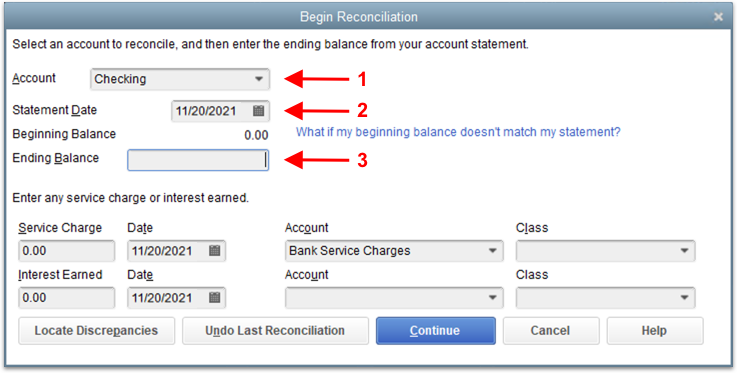
From the Begin Reconciliation window:
- Select the account from the dropdown menu
- Input the statement date of the last completed reconcile in QuickBooks Online
- Input the statement ending balance from that reconcile
- Leave the Service Charges and Interest at $0 - those have already been entered in QuickBooks Online.
- Click Continue
- Reconcile as usual
Things to note:
- Some transfers and General Journals may come across without their reconciled flag set - make sure to set those manually. If your account was fully reconciled before you brought it over you can check all of them that occurred prior to the reconcile date.
- If a transaction was "pending" in QuickBooks Online at the time of the conversion, the pending status does not convert.